

Website design and functionality are still considered to be in the domain of the technically and creatively gifted, which is exactly why Content Management Systems (we will call them CMS’s from here) developed and are now so popular.
So what exactly is a CMS?
Put simply a CMS is a platform, usually hosted online for you to log into from anywhere, which helps you build a website without needing to write all the code from scratch (or even know how to code at all). So instead of building your own system for creating web pages, storing images, and other functions, the CMS handles all that basic infrastructure stuff for you so that you can focus on more forward-facing parts of your website i.e. the content!
What?
Let’s illustrate what we mean, in order to publish a webpage by writing a static HTML file and upload it to your server (sounds complicated, right?). Let’s look at what that actually looks like:

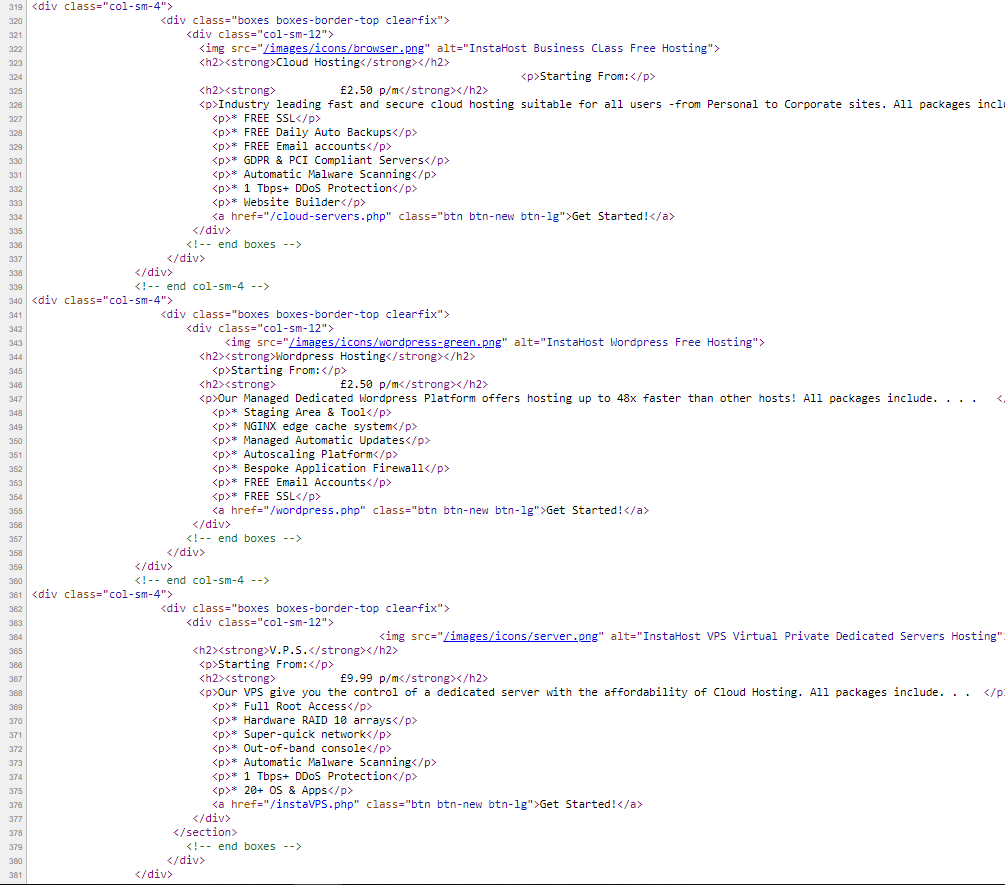
The image on the left looks simple, yes? However, the code itself, on the right, is the exact code JUST for that image on the left, and if you look carefully that code starts at 319 lines which have already been written! Because on every page you will need to include the “header” i.e. your logo and your navigation menu!
With a CMS, such as WordPress this is ridiculously simplified – you select a design or template (or build your own if you fancy it!) and then without worrying about headers, nav bars, etc, you can just write your content in an interface that looks very similar to Microsoft Word. For the most part – from the user’s point of view – WordPress looks much like the familiar interfaces at Facebook or Google Docs. You basically create new pages or documents and then have them published to the web.
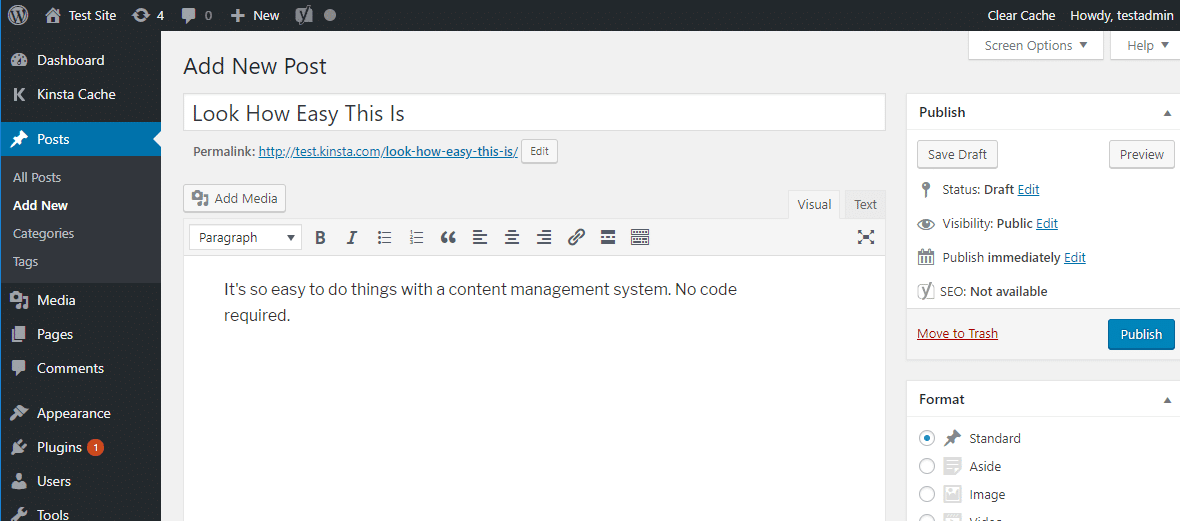
Adding images is as simple as uploading to Facebook or Instagram! Simply upload them in your WordPress platform and then you can pick, choose and manage your images from your own media library!

Now whilst we are focussing on WordPress, there are many CMS Platforms out there, here at Instahost we offer a range of the most popular available as a 1 click installation and, of course, we will install for you, including….
- b2evolution – Click here for demo page
- Concrete5
- Joomla – Click here for demo page
- SilverStripeCMS – Click here for demo page
- OctoberCMS
But we, at InstaHost built a bespoke Hosting Platform for WordPress, delivering lightning fast hosting, with a free SSL, free support and free backups, simply because WordPress is the biggest and most popular CMS in the world! Let’s look at some stats. . . .
WordPress runs 34% of the entire internet! – Around 19,500,000 websites on the entire web use WordPress.
- 50-60% is WordPress’ share of the global CMS market – making it the most popular CMS of them all for the 7th year in a row.
- Life+Times (JayZ’s Website) New York Post, The Obama Foundation, TED, CNN, BBC, TIME.com, The Walt Disney Company, Spotify, Vogue, TechCrunch, all use WordPress.
- WordPress is the fastest growing CMS, with roughly 500+ new sites being built daily in the top 10 million websites on the web (compared to Shopify’s and Squarespace’s 60-80).
- WordPress powers 14.7% of top 100 websites in the world.
- 17 posts are published every second on WordPress sites around the world.
- 37 million global Google searches for “WordPress” are made per month.
Taking a look at those impressive stats makes it easy to see why we focussed our bespoke CMS platform on WordPress!
Most content management systems are pretty flexible nowadays. While there are some that focus on a specific use – like Magento and eCommerce – but most of the popular content management systems can be used to create essentially any type of website.
For example, you can use WordPress to power:
- Static websites
- Blogs
- eCommerce stores
- Forums
- Social networks
- Online courses
- Membership sites
- Portfolios
Sound too good to be true?
Transparency is key for us at InstaHost so let’s look at the Pro’s and Con’s of WordPress:
Pros
1. Content Editing is Separate from Design
Your content editing is separate from the design and functionality of the overall site, so users that aren’t technically trained can add, format and edit their content on the website without having to concern themselves with design and coding.
2. Role Based Access Permissions
Every user can have selective access permissions based on their roles, such as author, editor, contributor, administrator, etc. You can choose to allow some users to add and edit their own content while giving others universal access. This helps to maintain security since external users such as contributors can have restricted access.
3. Speedy Updating
Site updates are quick and effortless when using a CMS. Even when using the administrative interface, components like menus, headers, footers and sidebars can be easily (and quickly) updated and rolled out across the whole site!
4. SEO-Friendliness
CMSs are very SEO-friendly. They can include custom page titles as well as metadata and adjustable URLs. Helper plugins are also available if you want tips on how to optimise your content.
5. The Most Popular Options Are Free
And here’s the best part, the basic framework of most CMS programs are free. In that case, you only need to pay more for further customisation options, such as a premium design or extra security.
Cons – Yes there are some Cons, which hopefully the InstaHost WordPress Platform addresses!
1. Security Risks
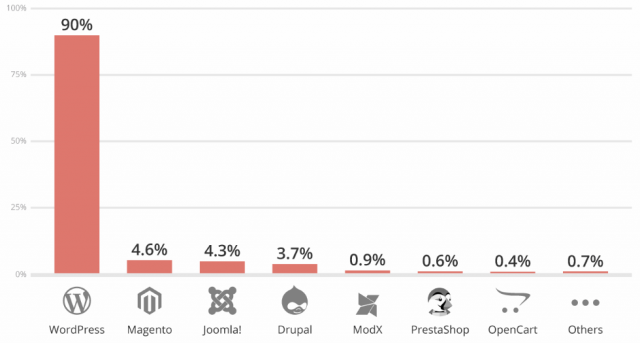
Wordpress is the most hacked CMS out there, in fact WordPress accounted for 90 percent of all hacked CMS sites in 2018. A pretty damming headline until we break it down, almost 87% of security breaches came from vulnerabilities in plugins and themes, misconfiguration issues, and a lack of maintenance by webmasters, who often forgot to update their CMS, themes, and plugins. Security experts said that over 50% of the sites investigated after an incident were running the up-to-date version!
So how does InstaHost deal with all this? We offer a groundbreaking platform exclusively designed for WordPress! And best of all – we manage it for you! So By default, our update service will ensure your WordPress install gets the latest versions and patches as soon as they’re available. We constantly review security advice from WordPress and actively disallow suspect plugins on our platform, we’ve also included a custom-made web application firewall to filter out malicious requests. And we scan your WordPress site daily for any unusual activity and malware. Of course, sometimes things go wrong (sometimes a user mistakenly deletes a page, an image or even a whole site!) but we have that covered, our Timeline Backups are there to protect your website data. They take daily backups of your WordPress site and database, allowing you to restore back to that time (or we can do this for you! for free!) Admin control Panels are often a source of attack, so we deploy a full Brute Force Login Protection, and optional (but free) two factor authentication!
2. Difficulties in Design
Design wise, it can be a challenge to transform your site into the exact way you want it. However, the correct amount of expertise and skill should be able to overcome this obstacle without much effort, though this might require extra funding on your part. There are a plethora of themes available for WordPress both FREE and to purchase and here at InstaHost we offer a Design offering to help you find the theme you are looking for or assist you in designing.
3. Lagging / Speed Issues
Wordpress store aspects of a page separately, then they assemble everything when you request a page. This can often lead to some lags, but the InstaHost Platform mitigates this by deploying our bespoke pre-configured NGINX edge cache system: InstaStackCache. It speeds up page loading for users. Although it works straight out of the box, advanced users might want to manage the cached content themselves. The StackCache plugin interface inside WordPress allows this.
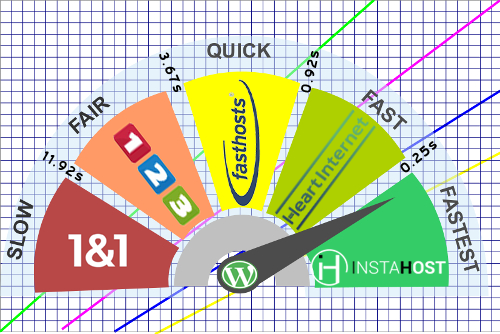
Independent LoadImpact testing demonstrates that WordPress pages hosted on the InstaHost WordPress platform load in less than a quarter of a second. Comparing this to the UK’s largest Webhosting companies, which can take up to 11.92 seconds to deliver your page, our platform is up to 48 times faster!
OK – WordPress it is, so what do I do now?
Have a look for our #2 of our WordPress Series, Getting Started or as it is really simple take the following steps
1: Purchase web hosting and a domain name – Actually at InstaHost, if you purchase an annual plan (which is cheaper) you get a .co.uk domain name free!
2: Install your content management system of choice on your web server – If you signed up with InstaHost your WordPress will be already installed and ready to go!
3: Configure the Theme (the design) to dictate how your site looks and functions
4: Start writing content using the WordPress interface
And that’s it! Now simply Download Our InstaHost-Wordpress-for-beginners to help you on your way (and don’t hesitate to contact our 24/7/365 Award winning support!)
P.S. If you’re a new business startup in the UK – you could get 6 months FREE WordPress hosting – Click here for Details!


